
Our Location
304 North Cardinal St.
Dorchester Center, MA 02124

$17,839.00
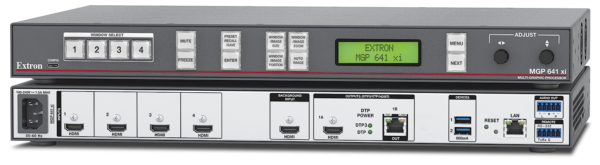
4K/60 HDMI Multi-Window Processor with DTP3 Extension
The Extron MGP 641 xi is a multi-window processor that scales and presents up to four 4K/60 HDMI source signals on a single screen. It features advanced Extron Vector™ 4K scaling technology for unequaled image quality and annotation capabilities with an Extron LinkLicense®. The HDCP 2.3-compliant processor supports live, non‑scaled content or graphic images behind the source windows. Windows can be arranged anywhere on the output canvas and rotated for landscape or portrait orientation. The MGP 641 xi SDI model includes support for 12G‑SDI sources. HDMI and DTP3 outputs deliver duplicate uncompressed 4K/60 signals to local and remote displays. Providing enhanced content presentation with customizable windows and transition effects, video keying, and on-screen annotation, the MGP 641 xi is ideal for high-end environments and live events.
4K/60 Signals on All Inputs and Outputs
The MGP 641 xi model provides four HDMI inputs, supporting signals up to 4096×2160 at 60 Hz with 4:4:4 color sampling. The MGP 641 xi SDI model includes four independently selectable inputs with HDMI and 12G-SDI source connections. All four sources can be displayed simultaneously. Both models feature an HDMI background input for presenting live, non‑scaled full-motion content behind the source windows. This input supports resolutions up to 4K/60 in landscape mode and up to 4K/30 in portrait mode. The background input also facilitates cascading as many as four MGP 641 xi processors to create a large-scale single digital canvas with up to 16 windows.
A single, HDMI output supports video resolutions up to 4096×2160 at 60 Hz with 4:4:4 color sampling. The DTP3 output can extend uncompressed 4K/60 signals up to 330 feet (100 meters) over a single, shielded CAT 6A cable. Bidirectional RS‑232 signals can be inserted from a control system and transmitted over this cable along with video and audio, enabling remote control of a source or display. For streamlined integration, power can be delivered to select DTP3 endpoints over the same shielded CAT 6A cable. The port can be set to support DTP3, XTP®, or HDBaseT transmission using SISâ„¢ – Simple Instruction Set commands or Videowall Configuration Software – VCS.
Flexible Window and Preset Management
Up to four live source windows can be displayed over a background consisting of live video, a still image, or a solid color. The window arrangement and background can be stored as a preset for later recall using a hard-cut or animated transition. Presets include sizing, positioning, and priority information for all windows and can be saved, recalled, and named through the RS‑232, Ethernet, or USB port. A total of 128 memory locations are available for storing window presets.
Auto-layout mode automatically configures the window layout to a full screen, side-by-side, pyramid, or quad-split arrangement. The configuration is based on which windows have an active input signal or graphic. When a signal is detected or removed from an input, the window layout automatically adjusts to accommodate the new source palette.
Advanced Vector 4K Scaling
The MGP 641 xi multi-window processor incorporates the Extron-exclusive Vector 4K scaling engine, developed in‑house and engineered to provide best-in-class image upscaling and downscaling. Vector 4K embodies several Extron-patented scaling technologies, plus a new set of image processing algorithms that deliver uncompromised scaling performance. This enables sharp, accurate 4:4:4 processing and scaling of video signals up to 4K, as well as downscaling of 4K source signals for display in small windows or on lower-resolution displays without losing critical image detail.
Optional Live Annotation with Extron LinkLicense
Available as an option is the LinkLicense® for MGP 641 xi Annotation that allows presenters to annotate over live video or presentations using a touch screen display or mouse. An intuitive and customizable on-screen menu allows for quick and easy annotation. In addition, annotated screen images can be captured and saved to internal memory or a removable USB flash drive.
The user-friendly on-screen menu provides quick access to the following essential annotation tools:
Pointer
Freehand
Line
Arrow
Rectangle
Ellipse
Size Select
Eraser
Color
Fill
Undo
Redo
Clear
Window Preset
Complete EDID Management
To ensure professional AV systems perform as designed, it is crucial that EDID communication between video sources and sink devices is managed correctly. Precise management of EDID allows source equipment to send video and audio signals in formats and parameters that best match display device capabilities. Mishandling of EDID could result in less-than-optimal image quality, no image, or poor sound.
A suite of Extron tools is available for complete control over EDID management. EDID Minder® technology offers a library of EDID files that can be applied to any video input. Additional EDID can be captured from connected displays or uploaded by the user. EDID Minder is easily accessible in VCS. EDID Manager 2.1 is a freely downloadable Windows® utility for viewing and editing EDID files. This software enables video format optimization, chroma sampling and color bit depth manipulation, and adjustment to audio capabilities. Edited files may be saved, added to the library, and easily applied to devices within the system.
Integrated Audio Support
Digital audio from any of the four windows or the background input can be de‑embedded and/or passed through as embedded digital audio. Multi-channel bitstream formats can be passed to the HDMI and DTP3 outputs. Also, embedded two‑channel PCM audio can be extended over the DTP3 output or extracted as balanced or unbalanced stereo audio to the analog outputs.
Local and Remote System Control
The MGP 641 xi processor features front panel controls and intuitive on‑screen menus for quick access to functions. In addition, local USB control allows users to easily adjust the size and position of windows with a connected mouse or touch screen display. Remote configuration and control are available via USB, RS‑232, and Ethernet. They can also be configured using Extron’s VCS software, a user-friendly application. It expedites setup, commissioning, real-time monitoring, and operation plus provides the capability to configure multiple Extron products in the same session


Reviews
There are no reviews yet.